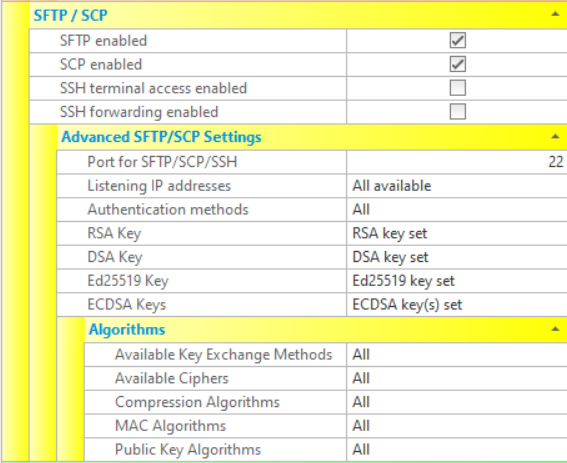
SFTP is an abbreviation for "SSH File Transfer Protocol"", and is exactly that - a protocol for transferring files over an SSH connection. SFTP is not the standard FTP protocol running over SSH. Although SFTP has similar capabilities and even similar commands to standard FTP, these similarities are purely superficial. The protocol is completely different and incompatible with FTP and its secure extension, FTPS. SCP is also a file transfer protocol that runs over SSH connections. It is a precursor to SFTP, and allows the copying of files and directories over SSH.
The various SFTP/SCP/SSH settings that are available to configure CompleteFTP are described below. Note that settings must be saved via the Apply Changes button, otherwise they will be lost.
Note that SFTP is not supported in the Free Edition, and that SCP and SSH terminals are not supported in the Standard Edition.
The Professional Edition and Enterprise MFT support all features described in this section.
| Setting | Description |
| SFTP enabled | If checked, the SFTP protocol is enabled. If not checked, the SFTP protocol will not be supported by the server. |
| SCP enabled (not available in Standard Edition) | If checked, the SCP protocol is enabled. If not checked, the SCP protocol will not be supported by the server. |
| SSH terminal access enabled (not available in Standard Edition) | If checked, users may (if permitted) log into the server using an SSH terminal. If not checked, SSH terminal access will not be supported by the server. |
| Advanced SFTP/SCP/SSH Settings | |
| Port for SFTP/SCP/SSH | Port that is used for SFTP, SCP and SSH. The standard port number is port 22. All of these protocols use the same port number. |
| Listening IP addresses | Lists the IP addresses to listen on for these protocols. All network interfaces can be selected, or individual interfaces selected. |
| Authentication methods | Methods of user-authentication that the server accepts. Note that these methods can also be specified at the user level.
When a user logins in, only the authentication methods specified at both levels are available. For example, if the site
permits password only, and the user permits password and publickey, then only password will be available. Available methods
are:
|
| RSA key | The RSA server key - the private key that the server uses to identify itself. The server normally has a DSA and an RSA key set (and more recently, ECDSA keys). This can be imported, exported or generated via the menu that appears when selecting the ellipsis (...) in the text box displaying the key's details. The private key can only be imported or exported if the CompleteFTP manager is running on the server that the CompleteFTP service is running on. |
| DSA key | The DSA server key - the private key that the server uses to identify itself. The server normally has a DSA and an RSA key set (and more recently, ECDSA keys). This can be imported, exported or generated via the menu that appears when selecting the ellipsis (...) in the text box displaying the key's details. The private key can only be imported or exported if the CompleteFTP manager is running on the server that the CompleteFTP service is running on. |
| ECDSA keys | The ECDSA server keys - the private keys that the server uses to identify itself. The Elliptic Curve Digital Signature Algorithm (ECDSA) is popular because keys are much shorter than RSA keys for equivalent strength. There are three ECDSA server keys supported, nistp256, nistp384 and nistp524. They can be imported, exported or generated via the dialog box that appears when selecting the ellipsis (...) in the text box displaying the key's details. The private keys can only be imported or exported if the CompleteFTP manager is running on the server that the CompleteFTP service is running on. |
| Algorithms | |
| Available key exchange methods | Controls what key exchange methods are supported by the server. It is rare that the defaults should be changed. It is possible that an administrator may want to disable weaker key exchange methods. |
| Available ciphers | Controls what ciphers are available to SSH for encrypting data. The default setting of All should generally be used unless some ciphers are required to be disabled. |
| Available ciphers | Controls what ciphers are available to SSH for encrypting data. The default setting of All should generally be used unless some ciphers are required to be disabled. |
| Compression algorithms | Permits the compression algorithms used in SSH to be selected. For example, if zlib compression is to be forced, then 'None' would need to be unselected. |
| MAC algorithms | Permits the MAC algorithms used in SSH to be selected. The default setting of All should generally be used unless some MACs are required to be disabled. |
| Public key algorithms | Controls what public key algorithms are supported by the server. For example, RSA public keys can be forced by disabling DSA. |