The Monitoring panel in the CompleteFTP manager displays real-time logging; details about the currently connected users; the IP addresses that have been auto-banned; server log files; and performance statistics (in Professional and Enterprise MFT only).
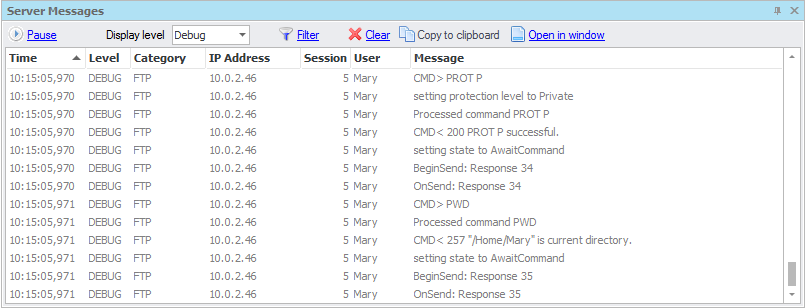
Recent logging message from the server are shown in the real-time logging panel.
In the client connections tab the current connections to the server are shown. The Kill selected connection option can be used to immediately disconnect a user from the server. The admin user cannot be killed.

In the auto-banned IP addresses tab, all currently auto-banned IP addresses are shown. Selecting an IP address and clicking Remove selected ban(s) will unban an IP address. Choosing Permanently ban select IP address(es) will add a permanent filter banning the selected IP addresses. In Professional and Enterprise MFT, auto-banning can be configured as shown below and as described here.

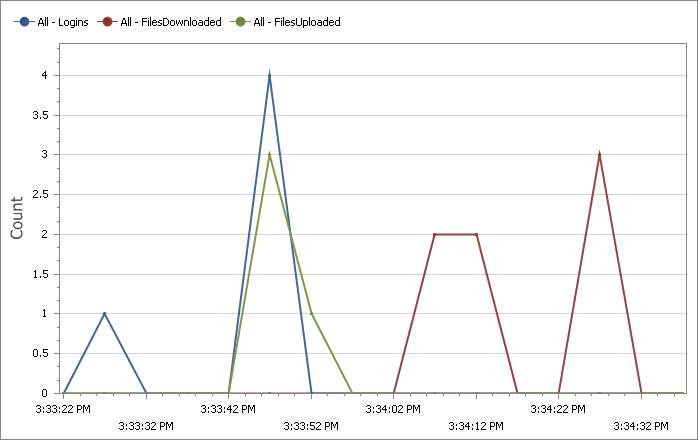
(Professional and Enterprise MFT only) A variety of real-time statistics can be charted, such as the number of connections, the number of file uploads and downloads, and the bytes uploaded and downloaded. These can be charted cumulatively and for each protocol.