FTP (File Transfer Protocol) is a well established Internet protocol designed to transfer files (and information about files) across networks using TCP (Transmission Control Protocol). FTP is defined in the Request For Comments 959 document ( RFC 959), which can be obtained from the Internet Engineering Task Force.
FTPS is FTP over SSL. There are two incompatible variants of FTPS: explicit and implicit. FTPS explicit is the most recent and most widely used variant. FTPS implicit is older and is generally being phased out. FTP and FTPS explicit can coexist on the same port (usually 21), in fact FTPS explicit connections start out as FTP connections before being switched to SSL. FTPS implicit requires its own dedicated port (usually 990).
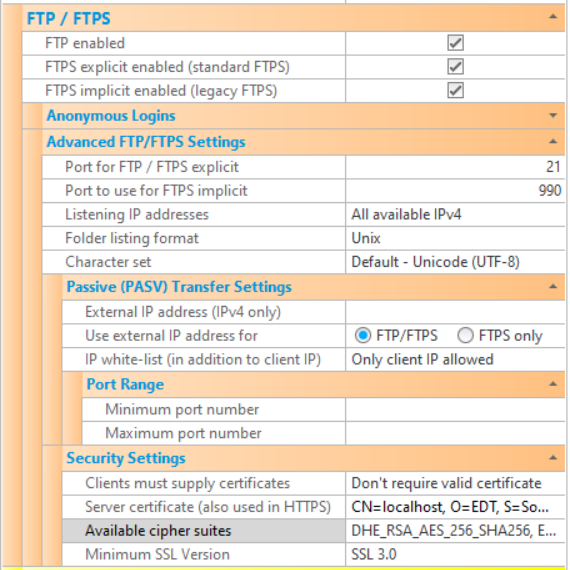
The various FTP/FTPS settings that are available to configure CompleteFTP are described below. Note that settings must be saved via the Apply Changes button, otherwise they will be lost.
| Setting | Description |
| FTP enabled | If checked, the FTP protocol is enabled. If not checked, the FTP protocol will not be supported by the server (although FTPS may be enabled, below). |
| FTPS explicit enabled (standard FTPS) | If checked, the FTPS protocol (explicit mode) is enabled. If not checked, FTPS explicit mode will not be supported by the server. If "FTP enabled" is not checked and FTPS (either implicit or explicit or both) is, then users are forced to use FTPS (i.e. they must connect securely). |
| FTPS implicit enabled (legacy FTPS) | If checked, the FTPS protocol (implicit mode) is enabled. This is a legacy form of FTPS that is still widely used. If not checked, FTPS implicit mode will not be supported by the server. If "FTP enabled" is not checked and FTPS (either implicit or explicit or both) is, then users are forced to use FTPS (i.e. they must connect securely). |
| Anonymous logins enabled | If checked, anonymous access is enabled. This means connections can be made by logging in as an anonymous user rather than as a named user with a password. |
| Max no. of anonymous connections | The maximum number of simultaneous anoynmous connections permitted to the server. |
| Advanced FTP/FTPS Settings | |
| Port for FTP/FTPS explicit | Port that is used for FTP and FTPS in explicit mode. The standard port number for FTP and explicit FTPS is port 21. |
| Port for FTPS implicit | Port that is used for FTPS in implicit mode. The standard port number for implicit FTPS is port 990. |
| Listening IP addresses | Lists the IP addresses to listen on for this protocol. All network interfaces can be selected, or individual interfaces selected. |
| Folder listing format | Format of folder listings being sent back to clients. In the FTP protocol folder listings are sent back to the client as plain text. This setting controls the format of this plain text. This is particularly significant for non-console client applications, which usually parse the directory listings automatically. |
| Character set | Character set that is used for encoding file-names. |
| Passive (PASV) Transfer Settings | |
| External IP address | In passive (PASV) mode transfers, the server listens on a random port between the minimum and the maximum port numbers specified, waiting for a connection from the client to this port. The server sends the client a reply to the PASV command that provides the IP address to connect to and the port number. This setting allows a hard-coded IP address to be set. If not set, the IP address of the interface that the server is listening on is provided. This setting is required in cases where the IP address of the server is not reachable by clients. For example, the client may need to connect to another IP address that is accessible externally, and a NAT device may direct the connection to the server. |
| Use external IP address for | In passive mode transfers, some routers don't cope with a hard-coded external IP address as set in External IP address - they expect to see the local LAN IP address in the PASV reply, and they replace this local address with the external IP address themselves. If the local LAN IP address is not found, some routers will abruptly terminate the connection. The solution in these situations is to only supply the hard-coded external IP address for encrypted (i.e. FTPS) connections, which the router can't inspect (and hence can't know what IP address is in the PASV reply). To do this, select the "FTPS only" setting rather than "FTP/FTPS" (which is the default). |
| IP white-list | By default, CompleteFTP accepts data-channel connections only from the IP address that the client initially connected from. In some network environments, however, the data-channel connection may come from a different IP address, even though it's actually from the same machine (which is always required). If this is to be allowed then those IP addresses may be white-listed here. This allows CompleteFTP to operate behind active/active firewalls requiring use of SNAT, including the Azure firewall. |
| Minimum port number | This is the minimum port number used in passive (PASV) mode. In PASV mode transfers, the server listens on a random port between the minimum and the maximum port numbers specified, waiting for a connection from the client to this port. |
| Maximum port number | This is the maximum port number used in passive (PASV) mode. In PASV mode transfers, the server listens on a random port between the minimum and the maximum port numbers specified, waiting for a connection from the client to this port. |
| Security Settings | |
| Clients must supply certificates | This option controls whether or not certificates should be requested from FTPS clients. If they are required then the client must send a certificate that may be validated against the Windows certificate store. This means that its issuer's certificate must be in the Windows 'Trusted root certificate authorities' store. |
| Server certificate | Displays the dialog for controlling the server certificate. A server certificate must be set if FTPS or HTTPS is enabled.
The dialog displays the current certificate's properties, and enables a new self-signed certificate to be generated.
Also, a certificate signing request (CSR) can be created to send to a certificate authority (CA) to obtain a CA certficate.
This property is shared with the HTTP/HTTPS settings. |
| Available cipher suites | This setting controls the cipher suites that can be used. Generally, the default is appropriate unless there are special requirements for a particular algorithm. |
| Minimum SSL version | This setting controls the minimum version of SSL/TLS supported on this site (for both FTPS and HTTPS). The default is TLS 1.0, which means that SSL 3.0 is not supported by default. This ensures that the server is not vulnerable to the security flaws of SSL 3.0. |