CompleteFTP supports the use of an audit log. The audit log records all important file transfer operations as well as login/logout.
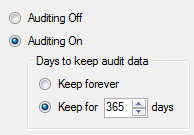
To enable the audit log, go to the Log Files tab found on the Monitoring tab in the manager, and select the "Configure Auditing" link. Select the "Auditing on" radio button.
Once enabled, CompleteFTP will record every operation in an auditing log file. Log files are 'rolled' by day such that each file contains all the operations for a given day. The file 'Audit.log' contains today's operations. Older files are named using the convention 'Audit.log.YYYYMMDD'. The number of days stored may be changed in this panel (or select "Keep forever" to keep all log files).